How do you see real distances to the stars with the 3D star map?
The interstellar 3D map places the stars around the Sun in three-dimensional space at their real distances and directions. Dragging rotates the space, the ruler changes how much of it is shown, and tapping a star opens a card with its distance and the time its light has taken to reach us. The scene is kept in the browser's address, so a single link reproduces the same view for someone else.
Why spread the night sky out into real space
In the night sky every star seems pinned to the same dome, as if all were equally far away. In reality their distances differ enormously. Proxima Centauri, the nearest star after the Sun, lies about 4.25 light-years away; Sirius, the brightest star in the night sky, about 8.6 light-years; and Betelgeuse, the red star in Orion, roughly 400 to 550 light-years by recent estimates.
Two stars that sit side by side in a constellation are often hundreds of light-years apart in depth. Because the 3D map keeps those distances, rotating it shows a familiar constellation pattern falling apart once it is seen from a different angle.
The map also makes it clear that a bright star is not necessarily a near one. Proxima Centauri is the closest star, but it is a small red dwarf about one-seventh the Sun's diameter and too faint to see without a telescope. Betelgeuse is far more distant yet so large and luminous that it ranks among the brightest stars in the sky.
Rotating with a drag and zooming with the ruler
Dragging sideways rotates the space around the Sun, and dragging up or down changes the angle so you look from above or below. The mouse wheel or a pinch zooms in and out. The map opens with the Sun at the centre, and when nothing is selected the Sun remains the pivot of every rotation.
The ruler along the bottom changes the scale too. Sliding it to the right fits more space on the screen, widening the view from a handful of neighbouring stars to star groups and nebulae thousands of light-years across. The number on the ruler tells you how much distance the current view holds.
The distance-rings chip draws rings around the selected object, and a second press adds a grid. Using the spacing between rings as a yardstick, you can estimate roughly how many light-years separate one star from another.
Reading distance and light time on a star's card
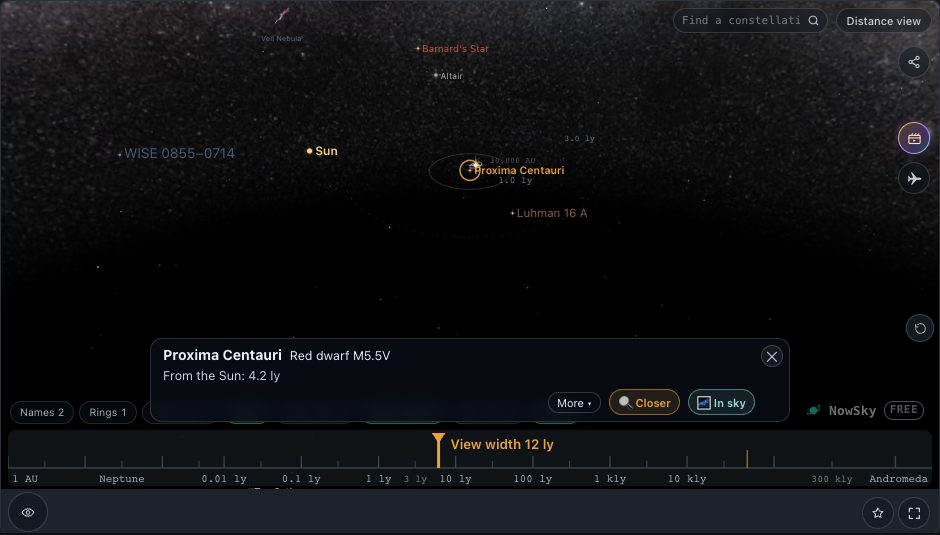
Tapping a star makes it the centre of the space, and further rotation pivots around it. The card at the bottom shows the name, the type of object, its distance from the Sun and how long its light takes to reach Earth. More ▾ opens a fuller description and figures.
Light time is also a reminder that we see each star as it was. Select Sirius and the card shows a light time of a little over eight years: the light reaching your eyes tonight left that star more than eight years ago. Sirius is itself a binary, with a white dwarf companion circling the bright main star roughly every 50 years.
The up and down arrows at the bottom left step through the objects you have picked. Closing the card with its ✕ leaves an Info | ✕ button at the bottom right; pressing that ✕, or tapping empty space, clears the selection and returns the centre to the Sun.
 ▶ Open in the simulator
 The Measure distance and See in sky buttons
Measure distance on the card dims every star except the Sun and the one you chose, and draws the line between them, so the gap stands out even in a crowded field. The comparison target can be switched from the Sun to another object, which makes it possible to measure the distance between two neighbouring stars directly.
See in sky finds the same star in tonight's sky in the Sky view. After checking where a star sits in space, you can jump straight to the constellation and direction where it appears from the ground, and the card there leads back to the 3D map.
The bottom chips and the light-speed journey
The chips along the bottom choose what is drawn. Names runs from 0 (only while moving) to 3 (as many as fit). Deep sky shows nebulae and clusters at step 1 and adds the directions of pulsars and black holes at step 2. The Milky Way chip draws a band at step 1 and a panorama photograph at step 2. Star look switches between true light and spikes with twinkle.
The solar-system structure chip overlays the outer boundaries of our own system: the Kuiper belt, the heliopause, the Oort cloud, the positions of the Voyager probes, and the sphere our radio signals have reached so far. Voyager 1 crossed the heliopause on 25 August 2012, the first spacecraft to enter interstellar space.
The ✈ button on the right holds an example journey at the speed of light. Once it starts, a strip at the top shows where you are travelling from and to and when you will arrive, keeping the true ratios: about 8 minutes to Earth, about 4 hours to Neptune and a little over four years to Proxima Centauri. Seeing even light take years to reach the nearest star turns the distance into something you can feel.
Moving to and from Orbit view, and sharing a scene by its address
In Orbit view, zooming out well beyond Neptune brings up a button at the bottom that, after a confirmation, continues into this map. Watching the planets first and then widening out to the stars makes the difference in scale easy to grasp: the gaps between planets are tiny next to the gaps between stars.
The magnifier searches stars, nebulae and clusters by name. Choosing one pulls the view back, swings it toward the object and zooms in again, which is also the quickest way to recover when you lose your bearings in the map.
While you use the map, the browser's address bar keeps the current state, including the selected object, in the URL. Copying that address and sending it by message or email lets the recipient open the same view with the same star selected, which is the simplest way to point out a particular star to a class or a group.
Try it in the simulator
- Proxima Centauri →The nearest star selected, shown with the Sun
- Distance to Sirius →Sirius selected, with its distance and light time on the card
- Find Betelgeuse →The red supergiant hundreds of light-years away, selected
- Open the 3D map →The neighbouring stars with the Sun at the centre
FAQ
- Why does the view jump when I tap a star?
- The selected object becomes the centre of the space, so rotation and distance rings are drawn around it. Tapping empty space makes the Sun the centre again.
- Why can't I see constellation shapes in the 3D map?
- Constellations are patterns that only exist from Earth's point of view. Turning the map so you look outward from the Sun brings back something similar, but a small change of viewpoint scatters the stars to their different depths.
- Are light-years and light time the same number?
- A light-year is the distance light travels in a year, so a distance in light-years equals the number of years the light needs. Light from Sirius, 8.6 light-years away, takes about 8.6 years to arrive.
Related reading
- Object Proxima Centauri
- Object Sirius
- Object Betelgeuse
- Guide How far are an AU, a light-year and a parsec?
- Guide How does the magnitude scale measure star brightness?